SiGeKo Documentation Software for Real-time | Onsite Construction Inspection Reports
2x Faster Report Creation
The new system's snippet-referencing capabilities 1/2 the time needed to build and finalize reports.
50% UI Efficiency Gain
Core UI refactor instantly doubled user operating speed across primary workflows.
Laramate is an outstanding partner for developing business software at the forefront of modern technology. I have worked with Chris and Tobi for several years and have come to value them not only for their technical competence but also as people. The development of the SiGeKo app I commissioned has advanced enormously through their input. The project now encompasses entirely new use cases that emerged through our ongoing collaboration, well beyond the original brief. Without their commitment and creative problem-solving, this would not have been possible. I look forward to a long-term continued partnership and can recommend Laramate as a reliable partner to anyone who wants to succeed with their business software.
— Matthias Klein, Founder
Safety and Occupational Health Coordinators (SiGeKos) carry a central responsibility on construction sites. They identify risks to construction workers, document defects, and compile the corrective measures required to resolve them. This work produces 2 mandatory documents:
The construction site inspection report: the complete defect list with photographs, descriptions, and corrective actions.
The SiGePlan (Safety and Occupational Health Protection Plan): the document that specifies how and on what legal basis each defect must be resolved.
Typical defects include handrails below the required height on open staircases, unprotected fall edges, and improperly stored hazardous materials. Every defect must be described in the report, linked to the relevant legal reference (building regulations, DGUV rules, accident prevention regulations), and assigned the appropriate corrective measure.
A single construction site inspection report can cover hundreds of defects, each with its own description, photograph, corrective action, and legal reference. Without the right tool, that is a full day’s work per inspection.
Client's Pain Point
The client had built up an extensive Excel database over years: thousands of text modules, each mapped to common defect types and already linked to the appropriate legal references. This knowledge base is the core intellectual asset of the business.
In practice, however, that knowledge ran into the limits of Excel:
Searching during inspections was too slow. When standing at a defect on site, the coordinator needs to find the right text module within seconds. Excel on a tablet is not built for that.
No version control for legal references. When a DGUV rule or building regulation changes, text modules must be updated. In Excel, previous versions are lost, even though historical reports must reference the regulations in force at the time they were written.
Report assembly as a manual break in workflow. On site, coordinators worked with notes and photographs. The report was assembled later at the desk through copy-pasting from Excel and manually matching images to defects.
The Excel database was a valuable knowledge resource for the coordinators, but not a workable tool for the construction site. The goal was: preserve that knowledge and make it usable on site.
The outcome was a mobile construction site documentation application that makes the existing text modules searchable, supports version control, and allows all data required for a fully qualified SiGeKo inspection report to be captured during the inspection itself.
What is the Unique Selling Point (USP)
The USP for MKSiGeko mobile construction site documentation application is its library of approximately 2,500 pre-written compliance snippets, each grounded in a specific statutory or regulatory provision spanning German construction law, European directives, and conventional industry guidelines. Every snippet carries a title, a ready-to-use text passage for direct insertion into site reports, and a direct citation of the underlying legal source.
The snippets are organised into a hierarchical, searchable category structure from parent category down to sub-category, so the applicable passage is retrievable by keyword in seconds. Searching “Absturz,” for instance, immediately returns all pre-written passages covering fall risk, each already referencing the regulation that mandates it.
The safety inspector does not write compliance language on site. Rather they select it. The workflow is: observe a site defect, photograph it, enter a keyword, select the matching snippet. It is inserted into the report with its statutory citation attached. No drafting, no manual citation lookup, no post-site reconstruction of field notes. No competing tool on the market provides this.
What can you now do on site that no available tool currently lets you do?
A complete site audit. All observations, photographs, and compliance references are documented and ready to save before the safety inspector leaves the site. No post-site drafting. No separate citation lookup. Benefits to safety construction coordinators:
Speed. The on-site workflow collapses to four steps: photograph site defects, enter a keyword, select the matching snippet, move to the next item. The snippet is inserted with its citation already attached.
Accuracy. Every snippet was pre-written and verified before it entered the library. On site, the safety inspector is not formulating compliance language from memory under time pressure. They are selecting from language that has already been checked against the applicable regulation. The risk of imprecise phrasing or a misremembered statutory requirement is removed at the point of entry.
Deliverables. The report structure is fixed and complete: headline, sequential numbering, location identifier, issue description, annotated image, compliance snippet with legal basis, tables where required. Every component of a standard Arbeits- und Sicherheitsplan or equivalent site safety report is accounted for. The output is a complete report, the deliverable.
Factual grounding. The 2,500-snippet library covers German construction law, European directives, and conventional industry guidelines. Each snippet carries a direct citation to its source. The inspector does not assert a standard. The standard is cited, by provision, within the report itself.
This software is bespoke. It was built specifically for the working reality of SiGeKos and was not configured from an off-the-shelf product.
The architecture’s function, in aggregate, moves the compliance knowledge work from the inspector’s memory to the system, leaving the inspector to observe, select, and move on.
How the Solution Works
The software is built as a Progressive Web App (PWA). The coordinator opens it on their tablet and works with it directly during the site inspection. It functions as a construction inspection app without app store installation, running on iOS and Android from a single codebase. The PWA also supports offline construction documentation: coordinators can capture defects, photographs, and voice notes without a site connection and sync when back in range.
Logging a Defect in 3 Steps
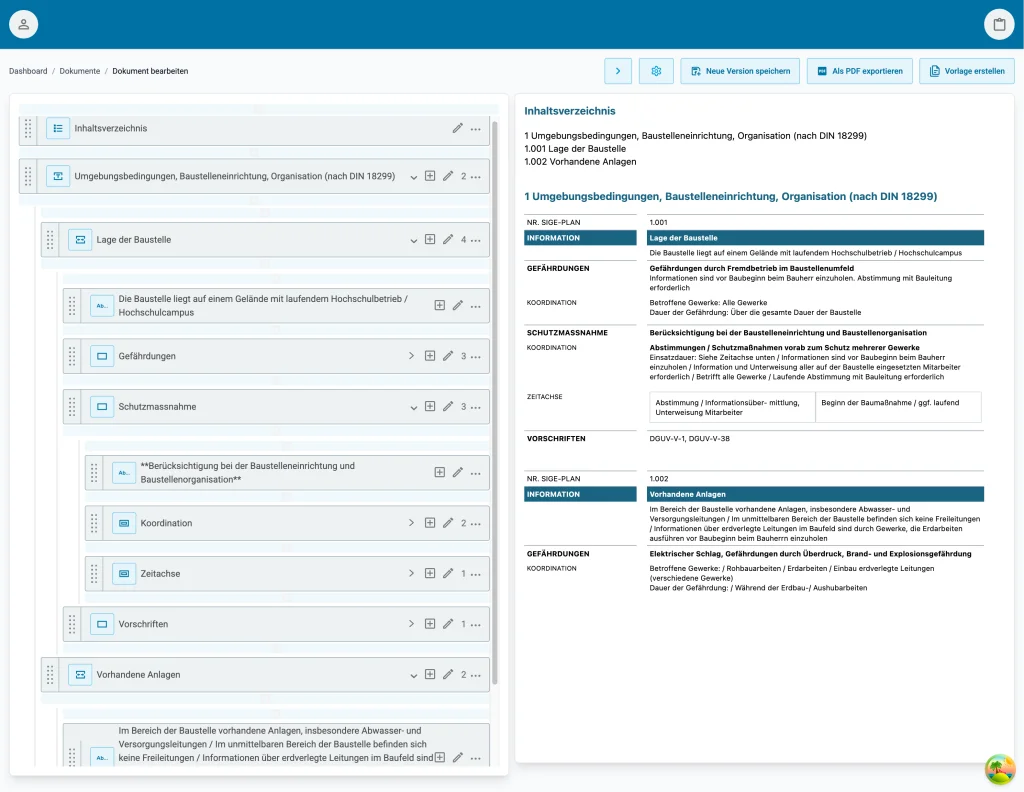
The core of the application is a document builder that the coordinator uses to compile the construction site inspection report defect by defect. The construction defect documentation app captures each issue on site with photograph, legal reference, and corrective action attached:
Find the text module. Through full-text search, the coordinator accesses the imported database and finds the right text module within seconds, including the pre-assigned legal reference and corrective action.
Attach a photograph. Using the PWA’s camera interface, the coordinator photographs the defect directly from within the app. The image is immediately assigned to the current defect in the report.
Add a voice note or comment. Through the PWA’s audio recording, additional information can be captured faster than typing with gloves or in variable lighting conditions on site.
In the ideal case, all data required for a fully qualified inspection report is captured during the inspection itself. The coordinator leaves the site with a finished document, not a stack of notes.
Once the inspection is complete, the MkSiGeKo documentation software generates a professionally formatted PDF at the press of a button, containing all defects, photographs, corrective actions, and legal references. The coordinator can download the document or send it directly from the application to site managers, clients, and subcontractors.
Versioned text modules follow a given structure. When legislation changes, DGUV rules are revised, building regulations are updated. Legal construction site reporting requires that every report references the regulations in force at the time of inspection, not the current version. The system has a versioning mechanism built in: when a text module is updated to reflect new legislation, a new version is created. Previous versions are retained.
A historical report does not store the current version of a text module. It stores a reference to the version that was valid at the time the report was created. This keeps every construction site inspection report legally defensible and fully reconstructible.
For reports that remain in progress for longer periods, the reference can be updated to the latest version when required. The complete version history of any text module is accessible across all versions, including which reports reference which version.
To ensure data accuracy and factual grounding, roles and permissions are well defined. Not every user can do everything. The application includes a granular roles and permissions system that defines who can maintain text modules, create new versions, produce reports, or approve them for distribution. Governance over the knowledge base stays clearly defined.
How Was the Solution Built
The software follows a standard 3-layer architecture, with a clean separation between frontend, API, and data layer:
React PWA frontend with Tailwind CSS: component-based, consistent visual identity, installable on tablet.
Versioned Laravel API: decouples the frontend from the backend and supports application data stored in versioned form.
MySQL database with a complex relational data model: including self-referencing structures for text modules, versions, and defect hierarchies.
The React frontend is divided into reusable components, styled consistently with Tailwind CSS. It maintains a clear visual identity throughout the product without requiring custom CSS for every new view. As a PWA, it uses native browser capabilities including camera access and audio recording, without the maintenance overhead of two separate native codebases for iOS and Android.
PDF Generation via Headless Chrome
Construction site inspection reports require a complex layout: tables, embedded photographs, headers and footers, tables of contents, and cross-references to legislation. Standard PHP PDF libraries reach their limits quickly with these requirements.
We generate PDFs in the backend with Headless Chrome. This allows complex styling with HTML and CSS, with the same layout capabilities available in a browser.
Maintaining and adapting report templates is significantly simpler as a result, as anyone who can read HTML and CSS can understand and modify the PDF layout.
Self-Referencing Data Models
In several parts of the system, the data model forms a directed tree with self-referencing nodes: text module versions reference their predecessors, defect categories are hierarchically structured, and report sections can be nested. Querying these structures row by row would be neither efficient nor maintainable. We used Recursive SQL queries, specifically Common Table Expressions (CTEs), to retrieve the entire tree in a single database query; the result is then mapped to Eloquent models only where ORM convenience functions are genuinely needed.
At performance-critical points, we deliberately avoid Eloquent, because the ORM is not the right tool for recursive queries across thousands of records. SQL handles this natively and quickly.
Development Challenges
Recursive SQL structures: Querying thousands of text modules in self-referencing hierarchies without running into N+1 queries, resolved through recursive CTEs in MySQL and selective bypassing of Eloquent at the highest-load access points.
Versioned data models: Reports must reference the historical version of a text module while the current version continues to evolve, without data duplication and without inflating report entries.
Drag-and-drop for report assembly: Reordering a long report with many defects on a tablet smoothly, with touch input including gloved hands on site. Migrated from react-dnd to Atlassian's Pragmatic drag-and-drop for better performance and finer UI feedback.
Performance With Recursive Data Structures
The combination of self-referencing trees and thousands of text modules was the central performance question in the project. A naive Eloquent implementation with lazily loaded relations would have produced N+1 queries and long response times, particularly during search on site where every second counts.
The solution: recursive CTEs in MySQL for hierarchical queries, supplemented by targeted indexes on the self-referencing columns. Eloquent models are used after loading as a convenient layer for business logic, not as the query mechanism.
Versioning Without Data Duplication
Versioned text modules require two things simultaneously: reports must reference the historical version, and the version history must remain compact and navigable.
The data model assigns each version its own entity, linked by self-reference to its predecessor. Reports store the ID of the specific version used, not the identifier of the “logical” text module. This keeps historical reports legally reconstructible without inflating the report record itself.
Drag and Drop for the Document Builder
To allow coordinators to reorder, group, and reassign defects within the report, the document builder requires a reliable drag-and-drop mechanism. We initially used react-dnd, which performed solidly for the first version of the product.
As the feature set grew, we reached the limits of its UI capabilities and touch interaction on tablets. We migrated to Atlassian’s Pragmatic drag-and-drop. It is significantly more performant, offers finer UI feedback, and handles complex nested drop targets, which is exactly what a report builder requires.
Changing the drag-and-drop library was not a preference. It was necessary so that coordinators could work smoothly through long reports with many defects on a tablet, including touch input with gloves on site.
Key Features
PWA For Tablet
Installable like a native app, without an app store. Works on iOS and Android from a single codebase.
2,500 Legally Cited Snippets
Thousands of text modules with legal references, found in seconds during construction site inspections.
Versioned Legal References
Each report references the version of a text module valid at the time of creation. Later legislative changes do not affect the legal defensibility of historical reports.
In-app Camera & Audio Recording
Defect photographs and voice notes captured directly in the SiGeKo app, assigned automatically to the current defect in the report, without switching applications.
PDF Export Complex Layout
Backend PDFs generated with Headless Chrome, including tables, embedded photographs, headers and footers, and cross-references to legislation.
Direct Email Distribution to Project Contacts
Completed construction site inspection reports sent from within the app to site managers, clients, and subcontractors.
Roles & Permissions System
Granular access controls define who can maintain text modules, create new versions, produce reports, or approve them for distribution.
Recursive SQL Queries
Self-referencing data trees loaded via recursive CTEs in a single query, performant across thousands of records.
Let's Build Your Next Project Together
Working With Outdated Documentation Workflows on Site?
We build construction site documentation software for field teams with complex compliance requirements.
Custom software for complex industry requirements
Free initial consultation within 24 hours
Cookie Settings
Some cookies are essential for the functioning of this site and cannot be deactivated. We also use cookies to analyse the performance and use of our website and to promote our marketing activities. You can find more information in our Privacy Policy. You can change your settings by clicking on "Settings".