


WordPress, TYPO3, or Statamic – Do You Need a Website or a Platform?
Most CMS comparisons focus on features and pricing. But the real question is different: Do you need a system that manages content — or a platform that powers your business processes? As a Statamic agency and official partner, we build custom software on the Laravel ecosystem — and we honestly explain when each CMS is the right choice.

Website or Platform? The Question CMS Comparisons Never Ask
CMS comparisons usually end with feature lists and pricing tables. But the real question is rarely asked: Do you need a system that manages your content — or a platform that powers your business processes?
If your website needs to sell courses, onboard customers, sync data with your ERP, or run a partner portal, then the CMS decision is really a platform decision. And that decision determines not just what your website can do today — but what it will be capable of in three years.
That's why we look beyond features and licensing costs to the Total Cost of Ownership (TCO) and the platform capability of each system: What does development, maintenance, and security cost over the entire lifespan? And most importantly: What does this system enable when my business grows?
WordPress: The CMS for DIY
WordPress is the most widely used CMS in the world for good reason. According to W3Techs, WordPress powers 42.4% of all websites — and 59.8% of all websites that use a known CMS. It's free, there are over 60,000 plugins in the official repository, and a motivated non-programmer can set up a functional website in an afternoon. For blogs, portfolio sites, and simple company websites, that's a genuine argument.
The Strength Is Also the Weakness
The plugin ecosystem enables quick solutions but also creates dependencies. According to WordPress.org, over 62,000 plugins are available, and a typical WordPress website uses between 20 and 30 of them. Each plugin is a potential security vulnerability, a performance bottleneck, and a maintenance burden — and at this volume, it adds up significantly.
On top of that, the number of plugin submissions to the WordPress repository doubled in 2025 — driven by AI-generated plugins, as the WordPress Plugin Review Team reports. The ecosystem is growing faster than it can be reviewed — a security risk we'll examine in detail.
Where WordPress Hits Its Platform Limits
As long as your website displays content, WordPress works excellently. But as soon as custom business logic comes into play — a customer portal, automated processes, an interface to your ERP system — you run into a fundamental problem: WordPress was conceived as a blogging system, not an application platform. Every custom function requires a plugin or complex custom development that works against the system's architecture rather than with it. The result: technical debt that multiplies with every extension.
WordPress is ideal when:
You want to manage and extend the website yourself — without a developer
Standard functionality is sufficient (blog, contact form, simple shop)
The budget for initial development is limited
Short-term time-to-market is more important than long-term maintainability
TYPO3: The Enterprise CMS with Governance Ambitions
In the DACH region, no CMS comparison is complete without TYPO3. Especially in corporate and government environments, TYPO3 has been established for over two decades — and has earned its place there.
Where TYPO3 Excels
TYPO3 was built for complex organizational structures. Granular user permissions, native multilingual support for dozens of languages, multi-domain management from a single installation, and a tree structure that remains clear even with hundreds of pages — these are genuine advantages for large enterprises with many editors and strict approval processes. The security level is also high: TYPO3 has a dedicated security team and a clean track record.
Where TYPO3 Becomes an Economic Challenge
The downside: TYPO3 projects require specialized developers whose hourly rates are above the market average. Initial development typically takes significantly longer than with WordPress or Statamic. And the ongoing maintenance costs are substantial — according to CMS comparisons, maintenance and updates for TYPO3 are significantly more costly than for WordPress — in practice, monthly agency costs typically range from EUR 150 to 500 depending on scope. For small and medium-sized businesses with 5 to 50 pages, TYPO3 is often overkill: you're paying for governance features you don't need, and for complexity that slows down daily work rather than accelerating it.
Additionally, TYPO3 lacks seamless integration with modern developer workflows: Git-based content versioning, headless architectures, and connecting to business logic require significant additional effort compared to a Laravel-based system like Statamic. TYPO3 is an excellent governance engine — but not an application platform. If you want to map custom business processes alongside your website, you need to build a separate system and glue both together.
Statamic & Laravel: When the CMS Becomes a Business Platform
Statamic takes a fundamentally different approach: it is a CMS built on the PHP framework Laravel. No plugin dependencies, no bloated core, but a clean codebase that can be precisely tailored to your requirements. It's no surprise that Statamic has been awarded "Best Flat File CMS" multiple years in a row.
A Strong Choice for Traditional Websites Too
Not every Statamic website needs to be a business platform. For traditional corporate websites, company presences, and multilingual web pages, Statamic plays to its strengths just as well: a clean Control Panel that editors understand immediately. Blueprints that define exactly the fields and structures needed for consistent content. And a codebase without plugin baggage that stays lean and runs securely long-term — even if nothing changes on the site for months.
The key difference from WordPress: Even with a "simple" website, you don't pay with performance, security, or maintenance overhead for features you don't actually use. And if your requirements grow — a customer portal, an API integration, a second location with its own language — you don't need to switch systems, you just keep building.
Flat-File Architecture and Git-Native Workflows
Statamic stores content by default as flat files (Markdown/YAML) — without a database. The result: extremely fast load times, simple deployments, and a codebase that can be fully versioned with Git. Branching, pull requests, code reviews — everything that's standard in modern software development works with Statamic out of the box.
For teams that work with CI/CD pipelines, staging environments, and automated tests, this is a massive advantage. With WordPress and its database dependency, content synchronization between environments requires additional plugins, scripts, or manual exports — an error-prone process that Statamic eliminates entirely.
Integrate Any Business Logic Natively
The decisive difference: Because Statamic is built on Laravel, you can integrate any business logic directly into your website. Need to connect to your ERP system? Automated invoicing? A custom dashboard? With Statamic and Laravel, that's native programming — no plugin patchwork with insecure dependencies.
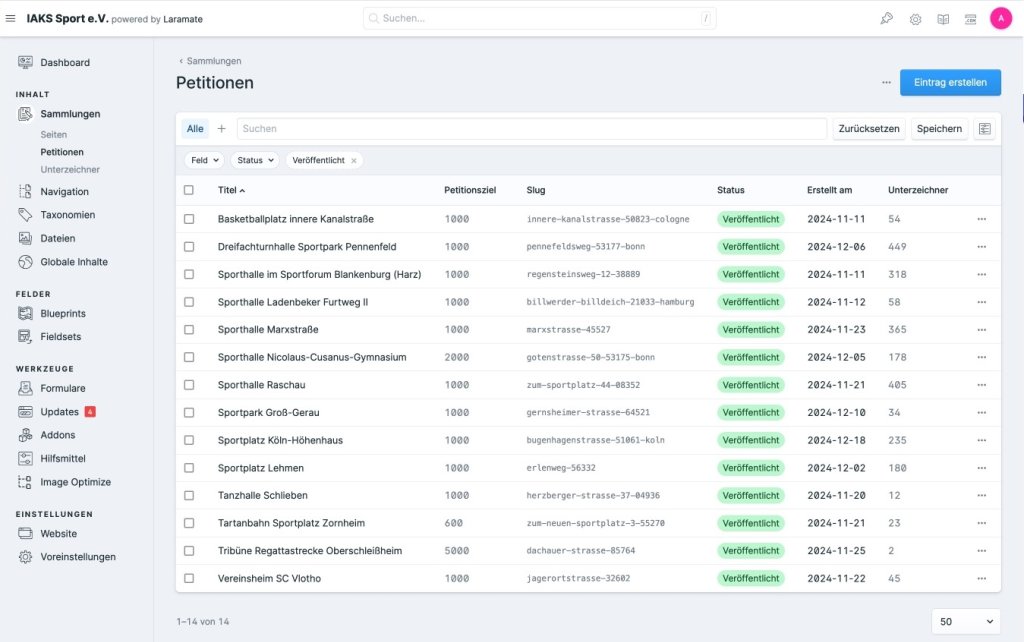
Statamic offers over 40 field types for content modeling, including Bard — a block-based editor that provides editors with a modern writing experience. Multi-site, localization in nearly 30 languages, live preview, and revision history are built in natively — features that each require separate plugins in WordPress.
The Laravel Stack Effect: When Everything Speaks the Same Language
One aspect missing from most CMS comparisons: technology synergy. When your CMS, backend, admin panel, and API are all based on the same framework, the advantage multiplies — in development, maintenance, and future expansion.
In a typical WordPress project, the reality often looks like this: the website runs on WordPress, the custom business logic runs on a separate Laravel or Node.js application, the admin panel is a custom build, and the mobile app communicates via a custom-built API with all systems. Every technology break creates friction: duplicate maintenance, knowledge silos within the team, synchronization issues between systems.
With Statamic on Laravel, these breaks disappear. The CMS is Laravel. The business logic is Laravel. The admin panel (e.g., with Filament) is Laravel. The API is Laravel. One stack, one language, one deployment — and every developer on the team can work on every part of the system.
Case Study: Safetyworx365 — From E-Learning System to Integrated Platform
A concrete example from our work: For Safetyworx365, we first built a multilingual e-learning platform for workplace safety training on Laravel. When the company needed a new website, the decision was clear: Statamic — because it runs on the same Laravel stack.

The result: The Statamic website is not an isolated brochure site but deeply integrated with the e-learning system. Customers purchase courses directly in the website's shop and are automatically onboarded to the learning portal — account creation, course assignment, and access email included. No plugin patchwork, no data syncing between two separate systems, no manual process.
With WordPress and a separate Laravel app, this integration would have required a custom API layer, webhook logic, and permanent synchronization. With Statamic on Laravel, it was native programming in a single system. That's the stack effect: every additional feature becomes cheaper, faster, and more maintainable because everything is built on the same foundation.
Day-to-Day: How Working with the CMS Differs
For executives and marketing leaders, what matters is not the technology under the hood, but how efficiently the team works with it. Here, the two systems differ significantly — and the differences directly impact productivity and ongoing costs.
Editing and Content Management
WordPress gives editors extensive freedom with the Gutenberg editor — sometimes too much. Without clear guidelines, inconsistent layouts and structures quickly emerge that need to be cleaned up after the fact. Statamic takes the opposite approach: Through Blueprints, the development team defines exactly which fields and options the editorial team sees. The integrated Bard editor with live preview provides a modern writing experience where changes are visible in real-time before publication. The result: less training overhead, more consistent content, and fewer IT support requests.

Design: Custom-Built Instead of Off-the-Rack
WordPress thrives on thousands of pre-made themes. This enables a quick start but often results in websites that look alike or become bloated and slow through page builders like Elementor. With Statamic, every design is individually developed and precisely tailored to your brand. This means higher initial costs, but a result that stands out from the competition and remains performant long-term.
Core Features Without Plugin Chains
An underestimated cost factor with WordPress: Contact forms, SEO optimization, multilingual support, and custom fields each require separate plugins — often paid and from different vendors with varying update cycles and billing models. Statamic ships with forms, search, navigation, SEO tools, over 40 field types, and taxonomies as part of the system. Every feature that doesn't need to be purchased as a plugin is one less dependency and one less invoice.
Multilingual and Multi-Site
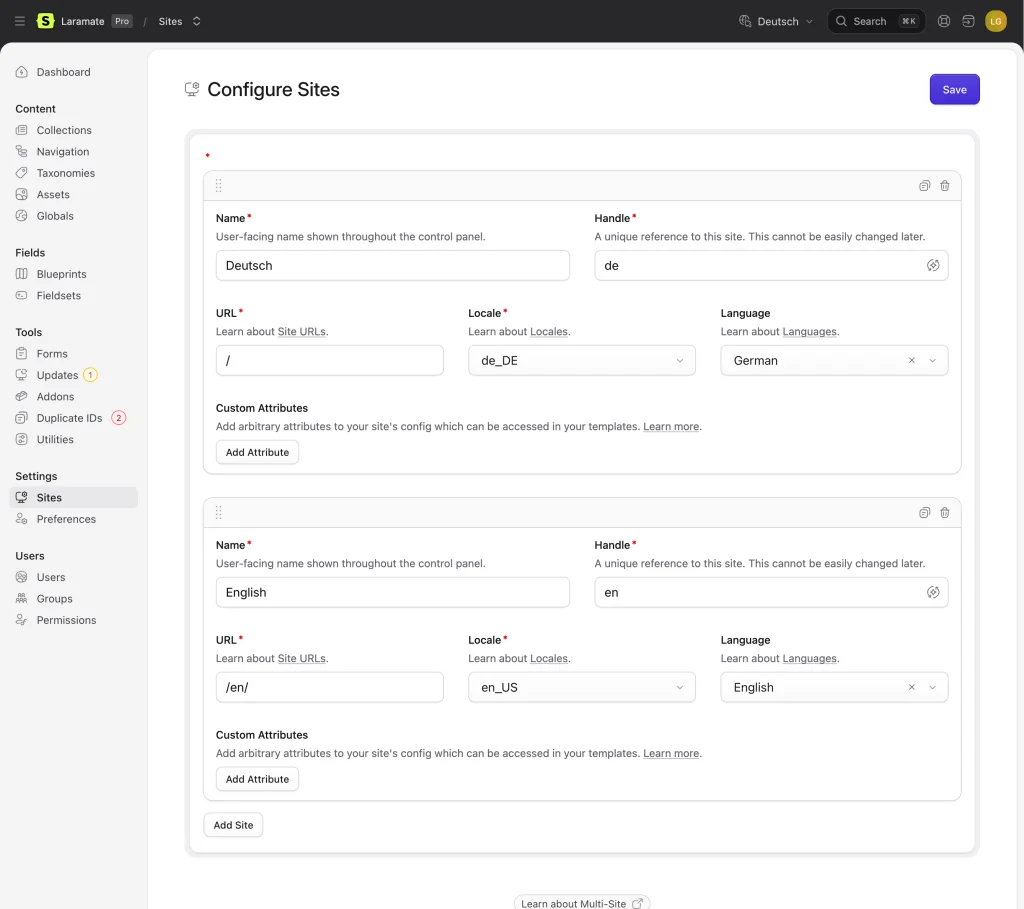
For businesses that maintain content in multiple languages, this is a key criterion. WordPress solves multilingual support through paid plugins like WPML — maintenance-intensive and a frequent source of errors during updates. Statamic supports multilingual and multi-site natively from a single installation, without additional costs or plugin risks.
System Integration and API Capability
When your website doesn't stand in isolation but needs to exchange data with ERP, CRM, or a mobile app, the system architecture becomes critical. Statamic can be used as a headless CMS and offers a native REST API — content can be delivered not just on the website but also in apps, newsletters, or other channels. WordPress requires additional plugins and custom modifications for comparable scenarios.
Security: A Business Risk, Not Just a Technical Detail
Security is not just an IT topic — it's a business risk. A compromised CMS means more than technical effort: GDPR reporting obligations, potential fines, loss of customer trust, and in the worst case, personal liability for management. This is particularly relevant for businesses that set up their website professionally once and then run it for a long time without major changes: A system that remains secure even without constant updates is not a comfort question — it's risk management.
WordPress is the most frequently attacked CMS in the world — not because it's poorly built, but because it's the biggest target. The figures from the Patchstack State of WordPress Security Report 2026 paint an alarming picture.
WordPress: The Biggest Target on the Web
In 2025, 11,334 new security vulnerabilities were discovered in the WordPress ecosystem — a 42% increase over the previous year. Of these, 91% were found in plugins and 9% in themes. Only 6 vulnerabilities were reported in the WordPress core itself.
Particularly alarming: 1,966 vulnerabilities had a high severity rating and could be exploited for automated mass attacks — more than in the two previous years combined. And in penetration tests, hosting companies could only block 26% of WordPress-specific attacks with their standard security measures.
Especially critical: Premium plugins and themes are affected too. 76% of vulnerabilities found in premium components were exploitable in real-world attacks. And modern malware is becoming increasingly sophisticated — it uses cloaking techniques to show security scanners clean content while redirecting real visitors to phishing pages.
How Statamic Reduces the Attack Surface
Statamic eliminates the main attack vectors of WordPress architecturally:
No database dependency — SQL injection attacks, which account for a large share of critical WordPress vulnerabilities, are rendered ineffective
No third-party plugins needed — the 91% of WordPress vulnerabilities that originate from plugins simply don't exist in Statamic projects. Every extension is custom-built and vetted
Laravel Security Features — CSRF protection, encrypted sessions, secure authentication, and protection against XSS (the most common WordPress vulnerability type at 47%) are standard
No public admin panel — the Control Panel can be protected behind VPN or IP whitelisting. Broken Access Control — the most frequently exploited WordPress vulnerability type — is effectively prevented
For businesses that process sensitive data or must meet regulatory requirements, this is a decisive advantage. While WordPress operators must respond within the 5-hour window after a vulnerability becomes known, this attack surface simply doesn't exist in Statamic.
Performance and Core Web Vitals
Google's Core Web Vitals have been a ranking factor since 2021 — and here, clear differences emerge between CMS platforms. Data from the HTTP Archive Web Almanac 2025 show notable differences:
Even proprietary platforms like Duda (~85%) or Wix (~74%) outperform WordPress because they control the entire stack. WordPress ranks far behind among open-source CMS options.
The causes with WordPress are systemic: bloated themes, page builders like Elementor (which according to PagePipe analyses deliver significant amounts of uncompressed code), dozens of plugins injecting their own JavaScript and CSS, and frequently cheap shared hosting.
Statamic avoids these problems architecturally. The flat-file architecture eliminates database queries for content delivery. There are no plugin layers uncontrollably loading assets. And Laravel's built-in caching — complemented by Statamic's Static Caching — enables response times under 100 ms, without needing to configure additional caching plugins.
Total Cost of Ownership: The Honest Calculation
At first glance, WordPress appears cheaper: the CMS is free, themes start at EUR 50, and a freelancer can set up the site for a few thousand euros. Statamic has a license fee (for the Pro version) and requires a Laravel developer for initial setup.
But the TCO calculation shifts over time.
WordPress: Many Small Costs That Add Up
Regular plugin updates that can break each other, security patches, performance optimization against plugin bloat, and troubleshooting when the site goes down after an update — all of this happens regularly. According to Codeable, typical WordPress maintenance contracts run EUR 80 to 500+ per month. Add annual license costs for premium plugins, which with 10 to 15 paid plugins quickly add up to EUR 500 to 1,500 per year.
Statamic: One System, One Invoice
A single system with one dependency (Laravel) that updates via Composer. No plugin conflicts, no compatibility issues. Updates run through the CI/CD pipeline and can be tested on a staging environment before going live. Security patches affect a single framework instead of 20+ plugins.
Specifically: The Statamic Pro license costs USD 275 one-time, with an optional USD 65 per year for updates and support — directly from the team that develops the CMS. With WordPress, premium plugins like WPML (from EUR 39/year), Yoast SEO Premium (EUR 99/year), ACF Pro (from USD 49/year), and Gravity Forms (from USD 59/year) quickly add up to several hundred euros annually — from different vendors, with different billing cycles, and with no guaranteed compatibility between them.
Factor in the costs of security incidents — professional malware cleanup typically costs USD 100 to 500 per incident according to industry comparisons, significantly more for complex infections — and the difference becomes even clearer. With 11,334 new vulnerabilities per year and only 5 hours until a known vulnerability is massively exploited, the question is not whether an unpatched WordPress site gets compromised, but when.
The higher initial costs of Statamic pay for themselves in projects that run longer than 2 to 3 years. The more complex the project, the faster.
The Elephant in the Room: You Need a Developer
And here we come to the honest side of Statamic: While with WordPress a technically savvy marketing manager can install a new plugin, tweak a layout, or build a landing page, every structural change to a Statamic site requires a developer.
Statamic is like a bespoke suit — it fits perfectly, but someone has to tailor it first.
That's not a bug — it's by design. Statamic deliberately separates what editors do (manage content) from what developers do (build structure and logic). Editors get a clean, custom-tailored Control Panel where they see exactly the fields and options they need — no more, no less. But new page types, forms, or integrations? That's the developer's job.
For businesses, this means: Statamic pays off when you already work with a development team or a Statamic agency. If you want to make every change yourself, WordPress is the more honest recommendation.
This brings us to two customer types for whom Statamic delivers its full value:
Type 1: Businesses with Ongoing Development Budget
You already work with an agency or have an internal development team. Your website is more than a digital business card: it integrates business processes, grows regularly, and is actively developed. This is where Statamic realizes its full potential as a platform — every new feature builds on the same Laravel foundation instead of adding another plugin to the pile.
Type 2: Set It Up Right, Then Let It Run
You need a professional website that is set up cleanly once and then runs for a long time without major changes. This is where Statamic's security architecture plays its biggest advantage: No plugin ecosystem that needs constant patching. No database attack surface. A system that poses no security risk even after months without an update — unlike a WordPress installation, where the clock starts ticking after a vulnerability is disclosed.
CMS Migration: Why Switching Doesn't Have to Be a Mammoth Project
Most businesses considering Statamic already have a WordPress website. The question is not just "Which CMS is better?" but: "Is the switch worth it — and what becomes possible afterward?"
The technical migration — templates, configuration, deployment — is straightforward engineering work. The biggest perceived effort lies in the content: hundreds of pages that need to be rewritten, restructured, and prepared for the new system.
This is precisely where things have fundamentally changed. During our own website redesign, we migrated over 500 pages of content in a single week — with the help of LLMs. What would have otherwise taken months of manual work became the fastest part of the entire project. Texts are not just transferred but simultaneously optimized for the new tone of voice, page structure, and SEO requirements.
This means: The fear of content migration effort should no longer be a reason to stick with a system that no longer meets your requirements. Whether WordPress to Statamic, TYPO3 to Statamic, or even a custom CMS switch — the migration effort has dropped drastically through AI-assisted processes. The real question is no longer "Can we afford to switch?" but "Can we afford to stay with the old system?"
When Statamic Is the Right Choice
Statamic is not right for every project — but when it fits, it creates leverage that no other CMS can match. From our experience with dozens of projects, clear scenarios emerge:
Deep Integration with Business Logic — When your website is more than a business card: customer portals, booking systems, dashboards, automated workflows. Everything beyond "display content" is natively solvable with Statamic/Laravel, while WordPress relies on fragile plugin chains for the same.
Security-Critical Applications — Businesses in healthcare, finance, or handling sensitive customer data benefit from the reduced attack surface and native security features of Laravel.
Development Teams with Modern Workflows — Git-based deployments, code reviews, staging environments, automated tests. Statamic integrates seamlessly into professional development processes. WordPress with its database dependency makes this considerably more complex.
Long-Term Projects with Maintenance Requirements — When the website needs to grow, evolve, and be maintained over years, the clean codebase pays off. No plugin graveyard, no technical debt from incompatible updates.
Multi-Site and Multi-Tenant — All three CMS platforms — WordPress, TYPO3, and Statamic — support multi-site natively. The difference lies in depth: Because Statamic runs on Laravel, true multi-tenant architectures with individual business logic per tenant can be implemented. For example, we built a multi-tenant system for a design agency that other agencies use for their own clients — with isolated data, individual configurations, and a shared codebase.
When WordPress Is the Better Choice
We advise honestly — even when the answer is: WordPress is enough for your project. Specifically, WordPress is the better choice when:
There is no development budget for ongoing maintenance
The team wants to manage and extend the site entirely on their own
Standard functionality (blog, WooCommerce shop, contact form) covers the requirements
The website primarily serves as a marketing channel and requires no custom logic
In these cases, the WordPress route is not just cheaper but also the more honest one. A Ferrari is not better than a VW when you only need to drive to the supermarket.
When TYPO3 Is the Right Choice
TYPO3 has its place in large organizations with complex editorial structures: enterprises with dozens of editors, strict approval workflows, websites with hundreds of pages in many languages, and multi-domain requirements. When governance and compliance are the priority and the IT department has already built up TYPO3 expertise, a switch may cost more than it delivers.
Specifically, TYPO3 excels where granular permissions across editorial groups, page trees, and workspaces are needed. The integrated Workspaces system allows multi-stage approval processes — such as draft, department review, legal review, publication — that WordPress and Statamic can only replicate through custom development or plugins. The native multi-domain management via Site Configuration is also mature: each domain can have its own languages, entry points, and routing rules without requiring separate installations.
Another factor is the ecosystem in the DACH region. TYPO3 has an active community, certified agencies, and an established long-term support cycle (LTS versions are maintained for three years, with paid Extended LTS up to six years). For organizations with long-term planning cycles and internal compliance requirements, this predictability is a genuine argument.
For small and medium-sized businesses, TYPO3 is overkill in most cases. The higher development and maintenance costs — TYPO3 developers are more specialized and correspondingly more expensive — only pay off above a project size that justifies the governance overhead. If you don't need multi-stage approval processes or complex editorial permissions, you're paying for infrastructure that never gets used.
Conclusion
The decision between WordPress, TYPO3, and Statamic is not a question of "better" or "worse" — it's the question of whether you need a website or a platform.
The honest question is not "What does the CMS cost?" but "What will my business be able to do with it in three years — and what won't it?"
WordPress is the right choice when your website primarily displays content and you want to manage it yourself — without a developer and without custom business logic. The entry cost is low and fast. But: as soon as the website needs to grow into a platform, you hit architectural limits, and the long-term costs for maintenance, security, and plugin management should be factored in.
TYPO3 is suited for large organizations that require complex editorial structures, strict permission systems, and multi-domain management. It's a first-class governance engine — but not an application platform. If you need custom business logic alongside content, you'll need to build a separate system for that.
Statamic is the right choice for two types of businesses: First, for those that already have a development budget and want to use their website as a business platform — with custom business logic, deep system integrations, and a stack that grows with the company. Second, for businesses that want to set up a professional website once and run it securely long-term — without permanent plugin patching and without worrying about the next security incident. In both cases, the higher initial costs pay for themselves through lower ongoing costs and significantly less risk.
If you're unsure which system is right for your project: Talk to us. We advise openly and also recommend WordPress or TYPO3 when it's the better solution.
No results One result
Too many searches in a short time. The search is not reachable right now.
Please wait a moment, then carry on. Please try again in a moment.