CONCEPT DEVELOPMENT
The conceptual architecture of the project is built on a principle of reuse: rather than rebuilding capabilities that already existed in the LMS - checkout, enrolment, participant management, certificate issuance - the website was designed to leverage them. Statamic serves as the public interface and storefront; the LMS remains the operational engine.
This separation of concerns is both technically sound and commercially efficient. It avoids duplication of business logic, reduces the surface area for maintenance, and produces a system where each component does precisely what it is designed to do. The website surfaces data; the LMS processes transactions. The concept transforms an existing operational platform into a commercially accessible product by adding a public-facing layer without altering the platform itself.
The e-commerce model follows established conventions: category browsing, product listing, product detail, checkout. This familiarity reduces friction for B2B buyers and requires no user education.
SEO
Search Engine Optimisation (SEO) was an explicit project requirement and a non-trivial technical challenge. Because course content lives in the LMS database, outside Statamic's content model. Statamic has no native awareness of it. Without intervention, Google would receive no sitemap entries for product pages, which would effectively render the online shop invisible to organic search. For a business acquiring customers through search, this would be a material commercial liability.
Here, 2 custom integrations were developed to address this:
1. Extended XML Sitemap Generation: Statamic's sitemap functionality was extended to include all instruction content sourced from the LMS database. When a new course is created in the LMS, it is automatically added to the Statamic sitemap without manual intervention. This ensures that Google is continuously informed of the full product catalogue.
2. Live Preview for External Content: A custom live-preview integration was built so that editors can preview instruction content within the Statamic control panel even though that content is not stored in or managed by Statamic. This enables editorial quality control over pages that combine Statamic-managed content with LMS-sourced data before they are published.
Both integrations illustrate Statamic's capacity to extend beyond its default functionality to serve complex, real-world SEO requirements.
DESIGN & UX/UI
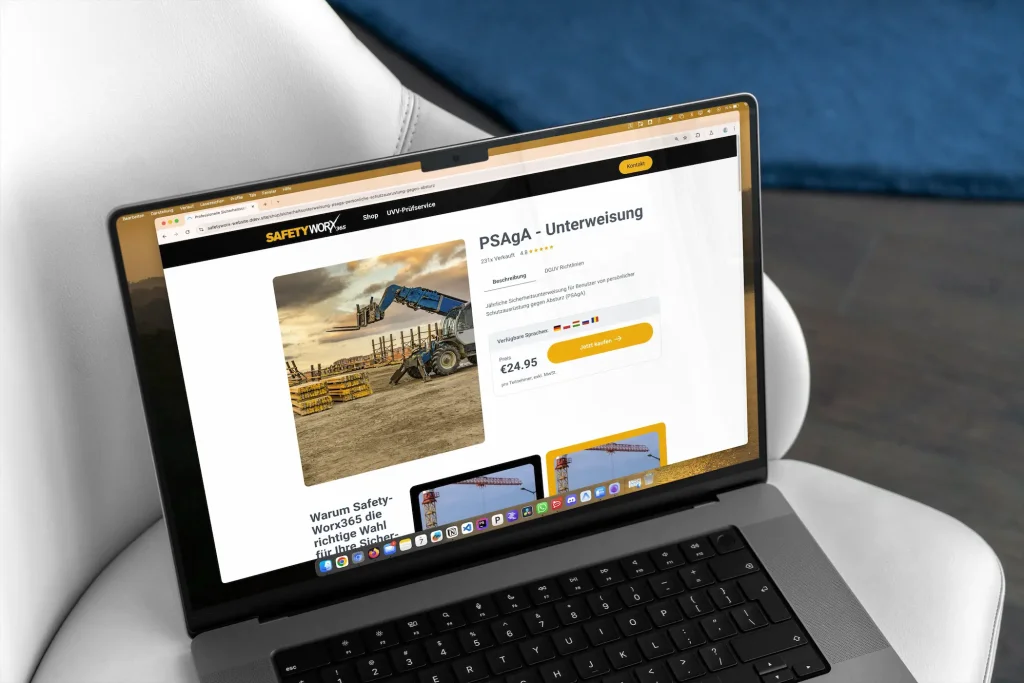
The product detail page was designed to meet standard e-commerce conventions, presenting:
This data is pulled dynamically from the LMS database via a custom content block.
The page builder architecture allows editors to surround this dynamic data block with manually authored editorial sections covering auxiliary information:
The result is a product page that is simultaneously data-driven and editorially flexible. The dynamic content is always current, while the supporting editorial copy can be managed independently through the CMS.
The purchase flow follows a standard e-commerce pattern: product discovery via category listing, product evaluation via detail page, and conversion via a redirect to the LMS checkout. The checkout itself handles self-registration, billing detail entry, employee nomination, and payment. The overall UX mirrors the conventions of a well-established B2B online shop, which reduces on-boarding friction for buyers.
TECHNICAL IMPLEMENTATION
The technical architecture consists of 2 separate repositories:
Statamic CMS application
Safetyworx365 LMS
The key technical decisions are as follows:
Direct database integration (no API layer):
The Statamic application reads directly from the LMS's database. This eliminates the need to build, maintain, and secure a dedicated API between the two systems which inherently reduces engineering complexity and latency.
Flat-file content management:
All content managed within Statamic: page layouts, editorial copy, interactive materials, is stored as a flat-file system which simplifies content versioning and deployment.
Read-only data boundary:
Statamic reads LMS data but does not write to it. Course management remains exclusively within the LMS which prevents data duplication and preserves a single source of truth for course content.
Custom content block type:
A bespoke content block was developed within Statamic to retrieve a specified instruction's data from the LMS database and render it as a structured product listing. This block can be placed within any page in the Statamic page builder and combined with standard editorial sections.
Custom sitemap integration:
Statamic's sitemap generation was extended programmatically to incorporate LMS course data, ensuring full SEO coverage of the product catalogue.
Custom live-preview integration:
A live-preview mechanism was built to allow editors to preview LMS-sourced content within the Statamic control panel, enabling quality review of product pages prior to publication.
Checkout handled by LMS:
The purchase transaction is not processed by Statamic. On clicking to purchase, the customer is redirected to the LMS, where a dedicated checkout flow handles self-registration, billing detail collection, payment processing, course unlocking, email notification, and certificate issuance. Statamic delegates these functions entirely to the LMS, leveraging existing, proven workflows.
ONLINE-SHOP CONNECTIVITY
The online shop is the central commercial function of the rebuilt website. Its implementation spans both Statamic and the LMS:
|
Product catalogue:
|
Statamic renders a browsable product catalogue sourced from the LMS database, organised by safety instruction category. Each category page lists the relevant courses; each course links to a dedicated product detail page.
|
|
Product detail page:
|
A custom Statamic content block retrieves course data from the LMS database and renders it as a structured product listing alongside manually authored editorial content managed in the CMS.
|
|
Purchase flow:
|
On initiating a purchase, the customer is redirected from the Statamic website to the LMS checkout. There, they complete self-registration, enter company and billing details, nominate employees for enrolment, and process payment.
|
|
Post-purchase automation:
|
Upon successful payment, the LMS automatically unlocks the purchased course, dispatches an email notification with a direct link to the course dashboard, and upon course completion, it generates and delivers a PDF certificate by email.
|
ONLINE-SHOP CONNECTIVITY
From struggling with a self-built website with constant strain to onboard both employers and employees, the result is a fully automated end-to-end transaction. From product discovery on the website to certified course completion, no manual involvement from Safetyworx365 is required at any stage.